
WhatsApp Business APK: Everything You Need to Know
 BellyJoe
Opening a WhatsApp Business account is a key step for many companies. You can connect directly with customers where they are most active. This guide explains how to use the WhatsApp Business APK file for installation.
Introduction
WhatsApp Business is a free app for small and medium businesses. It helps you talk with customers in a professional way. Some people look for an "APK" version. They use it instead of the official app store. This choice has its own benefits and risks.
WhatsApp Business gives you tools to automate messages. You can sort and respond to them quickly. It creates a professional space for your brand. People already know and trust the platform. An APK is just another way to get this app on your Android phone. We will look at why you might choose this and what you should know.

Understanding the WhatsApp Business APK
You should understand what an APK file is before you download one. This knowledge helps you make a safe choice for your business phone. It is not the same as the normal installation process.
What is an APK?
APK means Android Package Kit. It is the file type that Android uses to install mobile apps. It is like an .exe file on a Windows computer. It has everything the app needs to install on your phone.
The Google Play Store handles the APK file for you. It downloads and installs the app in the background. Downloading an APK directly means you manage this process yourself. You are skipping the official app store completely.
Why Download the WhatsApp Business APK?
People have many reasons to get the APK file directly. Sometimes you want new features before everyone else. Developers often put new beta features in APKs. These are not on the Play Store yet. This lets you test new tools early.
Location rules can also be a problem. An app may not be in your country's Play Store. An APK can get around this limit. You might also want an older version of an app. This can be useful if a new update has issues. Finally, the Google Play Store might not work correctly. An APK is a direct installation method. It can solve this issue.
Risks Associated with APK Downloads
This ease of use comes with big risks. Security is the main concern. APK files from unsafe websites can have malware. They can steal your data or harm your phone. You must be very careful where you get the file.
Apps installed with an APK do not update automatically. You have to find and install new versions yourself. This is needed for security updates and new features. This can be a hassle and leaves your phone at risk. The APK might also not work with your phone. Lastly, a modified app could break WhatsApp's rules. This could get your account banned for a time or forever.
How to Safely Download and Install WhatsApp Business APK
If you decide the benefits are worth the risks, be very careful. Your business data and customer information are important. A safe process is very important to protect them.
Choosing a Reputable Source
The most important step is to pick a safe source. Avoid strange websites with many pop-up ads. Look for well-known and respected APK websites. Sites like APKMirror or APKPure are usually safe. They check the app files for safety. This makes sure the files are original and not changed.
Signs of a bad source include a poor website design. It might also ask for private information. If a site makes you download other software, you should leave. Use sources that have a good history of clean files.
Step-by-Step Installation Guide
The installation is easy once you have a safe file. First, you must let your phone install outside apps. Go to your phone's Settings. Then find the Security or Privacy menu. Look for "Install unknown apps" or a similar option. Turn it on for your web browser.
Next, download the WhatsApp Business APK file. After the download finishes, open your file manager. Or you can tap the download notification. Tapping the APK file will begin the installation. Follow the steps on the screen. After it installs, open the app. Then set up your business profile. It is just like the official version. This includes checking your phone number.
Verifying the APK's Authenticity (Optional but Recommended)
For more safety, you can check the file. Good websites give you a special code for the file. You can use another app to check this code. If the codes match, the file is real. It has not been changed. This step is a bit hard. But it helps you know the file is safe.
Features of WhatsApp Business (via APK or otherwise)
It does not matter how you install the app. The main features are the same. These tools make business communication easier. They also make it more professional. They help you save time and serve customers better.
Business Profile
Your business profile is like your shop window on WhatsApp. It gives customers important information quickly. You can add your business name and a description. You can also pick a category like retail or services. You should also add your address, email, and website.
A key feature is setting your business hours. This tells customers when you can chat. A complete and professional profile builds trust. It shows customers you are a real business.
Messaging Tools
WhatsApp Business offers several automatic message tools. Welcome messages greet new customers. They create a good first impression. Away messages tell people you are not available. They also say when you will reply.
Quick replies save a lot of time. You can create saved answers for common questions. For example, you can save answers about your store policies. This lets you answer common questions very quickly.
Organizing and Engaging Customers
Labels help you organize your contacts and chats. You can create labels like "New Customer" or "Payment Due." This makes it easy to track chats and manage your work. You can color-code chats to see them easily.
Broadcast lists send one message to many people. This is not like a group chat. People get the message as a private chat. This is great for news, sales, or updates. The product catalog lets you show your products in the app. Customers can look at items and ask questions in the chat.
Analytics and Insights
The app gives you simple data. This helps you understand your customers. You can see how many messages were sent and read. This data is simple. It helps you see if your communication is working well. You can see which messages work best. You can see how fast your team replies.
Best Practices and Considerations
To use WhatsApp Business well, you need to do more than install it. You need good habits to protect data. You also need to keep your chats professional. This is very important when using an APK version.
Regular Backups
Always back up your chat history. You can set up automatic backups to Google Drive. You can do this daily, weekly, or monthly. This protects your business chats if you lose your phone. A regular backup plan is a simple and important safety step.
Staying Updated (Manual Updates for APK)
If you use the APK version, you must do updates yourself. Check your source website often for new versions. Updates have important security fixes and new features. Not updating can put your business at risk. Plan to check for an update at least once a week.
Data Security and Privacy
Your customer's privacy is very important. Be open about how you use their information. Never share their contact details without their permission. Secure your phone with a strong password or fingerprint lock. Strong security protects you and your customers. When your business grows, you get many more chats. You will need a strong system to manage them. Large companies like Kingsport use tools like Botcake. They safely handle thousands of customer chats every day. They also protect customer privacy. This keeps chats organized and safe as the business gets bigger.
When to Revert to the Official Play Store Version
Think about switching back to the Play Store version. You might do this if you no longer need the APK’s benefits. The official version is safer if the feature you wanted is now public. It is also better if the Play Store is working again. It gives you automatic updates and peace of mind. For many businesses, stability is more important than early access to new features.
With the WhatsApp Official Play Store Version, businesses can enjoy a safer, more reliable environment. Botcake AI supports this by helping automate customer interactions and explore the latest WhatsApp features seamlessly. This ensures smooth performance and a better overall experience for both teams and customers.
Conclusion
The WhatsApp Business APK offers more choices. It can give you early access to new features. It can also help with app store problems. But these benefits have serious security risks. You must use a safe source for the file. You also must handle updates on your own.
The official Play Store version is always the safest choice. It ensures the app is real. It also gives you smooth, automatic updates. We recommend you choose the official source for your business. Companies want to improve customer chats. A secure app is the first step.
Once your WhatsApp account is active, explore Botcake AI to unlock even more potential. Leads and orders flow straight into your CRM in real time, automatically. You can also send bulk messages easily, manage customer conversations, and deliver fast, personalized replies. With Botcake AI, your business can enjoy automation, efficiency, and better customer experiences — all powered by the secure WhatsApp Official Play Store version.
Related blogs

How AI Changes Customer Experience: A Complete Guide
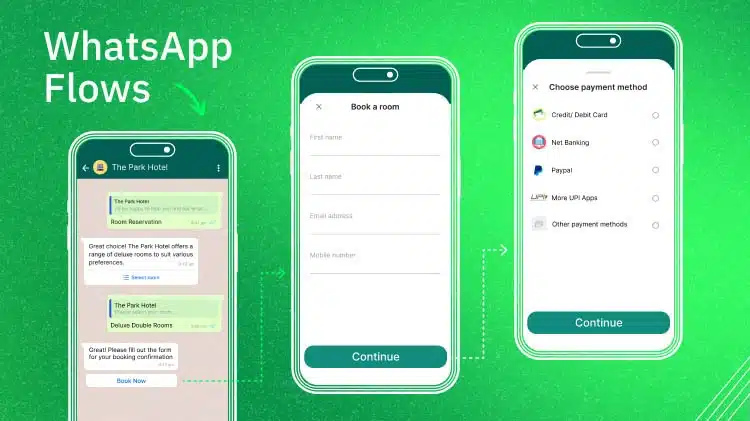
WhatsApp Flows: Revolutionizing Conversational Experiences on the World's Favorite Messaging App

The Future of Event Engagement: Your Guide to Event Chatbots

Discover how your business can connect with customers 24/7 with Botcake
- Automate your customer messaging flow
- React thousands with bulk marketing message campaigns
- Blend AI power seamlessly with your customer service