

Understanding Telegram URLs: A Comprehensive Guide
 BellyJoe
What’s a Telegram URL? How do t.me links for channels, groups, and bots work? Find out by reading how to create and use them in the most straightforward and flexible fashion to attract followers and interact with your customers with Botcake.
Introduction
The Rise of Telegram: More Than Just a Messaging App
Telegram has grown beyond simple messaging, becoming a powerful platform for communities and automation. With features like channels for broadcasting content, large supergroups for community interaction, and bots for automation and payments, Telegram now functions as both a communication and engagement platform for businesses.
What is a Telegram URL?
A Telegram URL is a direct link that takes users straight to a specific Telegram user, group, channel, or bot. Often seen as the “front door” of your Telegram presence, it makes it easy for people to find and join your community with just one tap. By sharing a single link instead of multiple steps, you can grow your audience and improve accessibility more effectively.
Decoding Telegram URL Structures
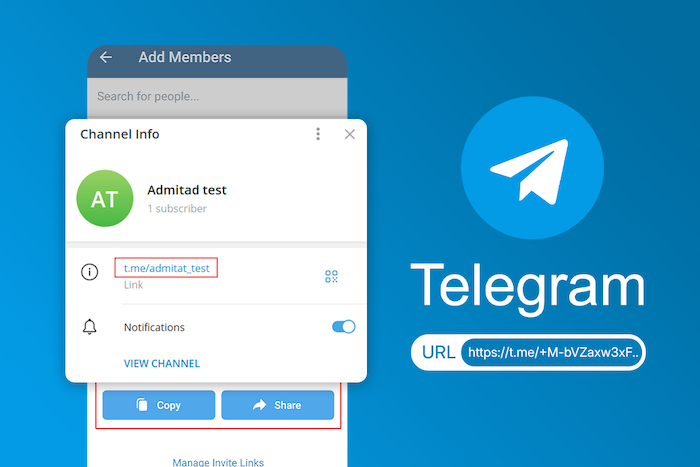
All official Telegram links are short and easy to remember. They all start with the same simple address: t.me/. What comes after the slash tells Telegram where to send the user.
Basic Telegram User Links
This is the most basic type of Telegram URL. It links directly to a person's public profile.
-
The "@username" format: Inside the app, you can find someone by searching for their unique @username.
-
"t.me/username": This is the public web link for that person. For example, if your username is @JohnDoe, your Telegram URL is t.me/johndoe. Anyone who clicks this link can start a chat with you (if your privacy settings allow it).
Channel Links
Channels are used to broadcast messages to a large number of followers. They have two different types of links.
-
Public Channel URLs: If a channel is set to "public," it receives its own custom username, just like a person. The link is t.me/channelname. For example, a news channel might have the link t.me/fastnews. Anyone can find and join this type of channel.
-
Private Channel Invite Links: If a channel is set to "private," it will not be visible in search results. The only way to join is with a special invite link. This link looks like a long string of random letters and numbers, such as t.me/+aBcDeF12345GhIjK. The channel owner can create and reset this link at any time.
Group Links
Groups are for many people to chat with each other. Just like channels, they have two types of links.
-
Public Group URLs: A public group also gets a custom t.me/groupname link. Anyone can click this link to find the group and join the conversation.
-
Private Group Invite Links: This is the most common type of link for smaller, private chat groups for friends, family, or work teams. It is a long, random link, such as t.me/+XyZ987AbCdEfG.
Bot Links
This is a very important feature for businesses. Bots are robot helpers that can automate conversations.
-
Direct Bot Links: Every bot has a unique username and a public link, like t.me/mybusiness_bot. When a user clicks this, it opens a chat with the bot, and they can tap "Start."
-
"Start" Parameter Links: This is an advanced trick. A developer can add extra information to the end of a bot's Telegram URL, like t.me/mybusiness_bot?start=offer123. When a user clicks this special link, the bot recognizes that they came from a specific location. This lets the bot send a custom welcome message, like "Welcome! Here is your 20% off coupon."
Post and Message Links
You can even obtain a Telegram URL that links directly to a specific message.
-
Linking to Channel Posts: If a channel posts a great update, you can tap and hold (or right-click) on the post and select "Copy Post Link." The link will look like t.me/channelname/123 (where "123" is the message number). This is ideal for sharing a key piece of news on other websites or social media.
-
Linking to Group Messages: You can also copy the link to a specific message inside a group chat to share it with other members of that same group.
Creating and Managing Telegram URLs
Now that you know what these links are, here is how you can make and control your own.
Generating Public Channel/Group Usernames
To create an easy-to-remember t.me/mybusiness link, you must first create a public channel or group on Telegram.
-
Create your new channel or group.
-
In the channel/group's info or settings page, tap on "Edit" (the pencil icon).
-
Tap on "Channel Type" or "Group Type."
-
Choose "Public."
-
In the "Link" box, type the username you want. Telegram will tell you if it is available.
-
Hit "Save." Your Telegram URL is now active and ready to be shared.
Best practices for usernames: Keep it short, easy to spell, and as close to your brand name as possible.
Creating Invite Links for Private Channels and Groups
If you want your group to be private, you use an invite link instead.
-
Create your new channel or group and make sure it is set to "Private."
-
Go to the info page and tap on "Invite Links" or "Add Members."
-
Tap "Create a New Link" or "Copy Invite Link."
-
Telegram gives you amazing control over these links. You can set an expiration date (like making the link stop working after 1 day) or a member limit (like making the link only work for the first 10 people who click it). This is great for creating special, limited-time offers.
-
You can also revoke (or cancel) an old link at any time to stop new people from joining.
Integrating Bots with Links
This is a more advanced feature, but it is the key to how many businesses use Telegram. When you build a chatbot (either with code or on a platform), you can set it up to look for "start parameters."
Third-party platforms, such as Botcake, integrate directly with the Telegram API to streamline this process. They allow you to automate interactions on this channel, easily generate tracking links, and monitor engagement rates to optimize your campaigns.
Sharing Content with Direct Links
This is very easy to do.
-
Inside any channel or group, find the message or post you want to share.
-
On a computer, right-click the message and choose "Copy Post Link."
-
On a phone, tap and hold the message, then tap "Copy Link."
-
You can now paste this link anywhere, in another chat, on your blog, or in an email. When someone clicks it, the Telegram app will open and scroll directly to that exact message.
Practical Applications and Use Cases for Telegram URLs

A Telegram URL is your most important tool for growing your audience and making it easy for people to talk to you.
Marketing and Promotion
This is the most common use. You can put your t.me/mychannel link in your Instagram bio, on your Facebook page, in your email signature, and on your website. This tells all your customers from other places that you have a Telegram channel they can join for news and updates.
Community Building and Management
Invite links are perfect for building a community. You can post your t.me/mygroup link on your website to invite all your fans to join a public chat group. Alternatively, if you have a paid course, you can send a private invitation link only to your students to grant them access to an exclusive, members-only group.
Customer Support and Sales
Some businesses use Telegram as their main customer support channel. They can put their t.me/mybusiness_support_bot link on their website. When a customer clicks it, the bot can ask, "What do you need help with?" and either answer the question or connect them to a human agent. This is a very fast and easy way for customers to get help.
Best Practices for Using Telegram URLs
To use Telegram URLs effectively, businesses should keep their usernames consistent and aligned with their brand across platforms. Tracking performance with tools like link shorteners helps identify which channels drive the most traffic. It’s also important to manage privacy by using public links for open access, private invite links for controlled groups, and avoiding common mistakes such as broken links or spammy link sharing.
Conclusion
Telegram URL is just that simple yet vendor of branding on the platform as it helps users identify the short t.me links as routes to the business enabling customer-based one on one conversations. Using public, private, and bot links in the right way is key to success when it comes to enhancing engagement and offering excellent service via the channel. If you combine these links with your chatbot, you can automate your sales via such a channel using a tool like Botcake.
Related blogs

Ready-to-Use Biz AI Prompts for Messenger That Drive More Sales

Ticket Handling Best Practices: Support for Customer Service
How to Switch Instagram to a Business Account (Easy Guide)

Discover how your business can connect with customers 24/7 with Botcake
- Automate your customer messaging flow
- React thousands with bulk marketing message campaigns
- Blend AI power seamlessly with your customer service