

How Does Facebook Pay Work? A Simple 2026 Guide
 Rojo Rizelle
In the fast-paced world of online shopping, where user patience is minimal, every second has a profound impact on conversion rates. Facebook Pay offers a faster, safer, and more seamless way to complete purchases without leaving Facebook or Instagram. A simple setup, a smoother payment journey — and more revenue within reach.
Introduction
The Evolution of Digital Payments
Not long ago, buying things online meant typing in your credit card number repeatedly. Now, we use digital wallets and payment apps on our phones to buy things with a single click or tap. As more of our lives moved online, companies like Meta (the company that owns Facebook, Instagram, and WhatsApp) wanted to make this process even easier.
What is Facebook Pay?
Facebook Pay (now known as Meta Pay) is a payment service that allows you to store your payment information in one place. Its main purpose is to make it simple and secure for you to pay for things or send money across all of Meta's apps, like Facebook - Messenger, Instagram, and WhatsApp. You just set it up once, and then you can use it everywhere without having to type in your card details every time.
Why Understand Facebook Pay?
It is helpful to understand how Facebook Pay works for several key reasons. For regular users, it is super convenient and secure. You can send money to a friend in Messenger just as easily as you send a message. For businesses, it is a game-changer. It makes it easier for customers to buy products they see on Instagram or Facebook, which can lead to more sales.
Setting Up Facebook Pay
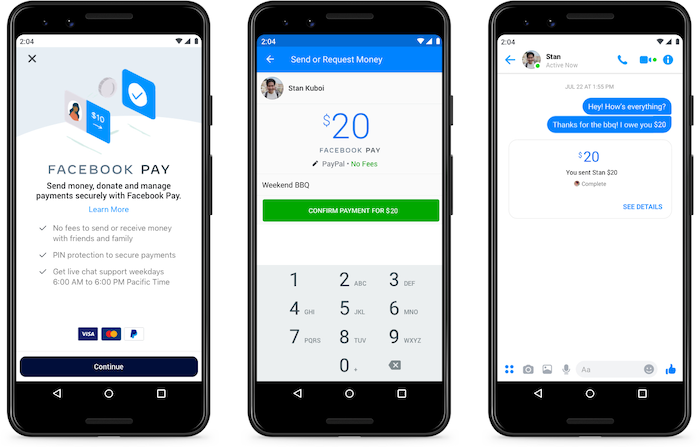
Getting started with Facebook Pay is a simple, one-time process. You can set it up in whichever app you use the most.
Where to Find Facebook Pay
You can find the setup page in any of Meta's apps. The easiest way is usually in your main Facebook app:
-
Go to your Facebook app.
-
Tap the menu (three lines) in the corner.
-
Go to Settings & Privacy, then Settings.
-
Look for and tap on Facebook Pay (or Meta Pay). You can also find this setup area in the settings of Messenger, Instagram, and in some countries, as well as on WhatsApp. Once you set it up in one app, it can be used across all of them (or you can choose to keep them separate).
Adding a Payment Method
To use Facebook Pay, you need to link a payment method. You will be asked to add a payment method. The most common options are:
-
A debit or credit card (like Visa or Mastercard)
-
Your PayPal account
In some countries, you may be able to add other local payment services; however, for most people, a card or PayPal is typically all that is needed.
Setting Up a PIN or Biometrics
Security is super important when it comes to money. After you add your card, Facebook Pay will prompt you to set up an additional layer of protection. This is to make sure that only you can make payments. Your options are:
-
A 4-digit PIN: A simple code you will have to enter for most payments.
-
Biometrics: This utilizes your phone's built-in security features. It is much easier and safer. This includes:
-
Fingerprint ID (like Touch ID)
-
Facial Recognition (like Face ID)
It is highly recommended that you turn this on. This way, even if someone has your phone, they cannot send money or buy things without your PIN or your face/fingerprint.
How Facebook Pay Works Across Meta's Apps
Once you are set up, you can start using Facebook Pay in various locations.
Making Purchases on Facebook Marketplace
When you are buying something from another person on Facebook Marketplace, you can often pay for it using Facebook Pay. For items that offer shipping, you can check out securely right inside Facebook. The seller gets the money, and you get your item, all protected by Facebook's payment system.
Sending Money on Messenger
This is one of the most popular uses. Have you ever needed to split a dinner bill with a friend or pay your roommate for rent? With Facebook Pay, you can send money to people directly in a Messenger chat.
You simply tap the "$" icon (or locate the "Pay" button), enter the amount, and then hit send. The money moves from your debit card to their debit card, usually very quickly. For most personal transfers, there are no extra fees.
Buying Things on Instagram
This is a big one for businesses. You have probably seen "Shop" tabs on your favorite brand's Instagram profile, or "product tags" on their photos. When you tap on a product you like, you can often check out right there inside Instagram using your saved Facebook Pay info. You don't have to visit a separate website or enter your address and credit card information.
Payments in WhatsApp (where available)
In some countries, such as Brazil and India, Facebook Pay is integrated into WhatsApp. This lets you send money to friends and family just like you are sending a photo. It also allows you to pay small businesses directly within the chat, which is very convenient for ordering food or paying for local services.
Donating to Causes and Fundraisers
When you see a fundraiser on Facebook or Instagram for a charity or a friend's cause, Facebook Pay makes it very easy to donate. You can donate in just a few taps with your saved payment info. This helps non-profits and causes raise money much more easily.
Security and Privacy with Facebook Pay

Many people ask, "Is Facebook Pay safe?" Meta knows that handling money requires a lot of trust, so they have built in several layers of security.
Encryption and Data Protection
When you enter your credit card number, it is not just saved as plain text. The information is encrypted, meaning it is scrambled into a secret code that is unreadable. Your full card number is not shared with sellers. The system follows PCI DSS compliance, which is a very strict set of security rules that all major payment companies (like Visa or Mastercard) must follow.
Fraud Prevention Measures
Facebook's computers watch for suspicious activity 24/7. If they see a payment that appears suspicious (such as from a new location or for a very large amount), they may block it and send you an alert. They also have a dispute resolution process to assist you if you purchase something and it fails to arrive or does not meet your expectations.
Privacy Settings and Controls
You are in control of your information. In the Facebook Pay settings, you can see a list of all your payment activity. You can also choose if you want your payment info to be shared across all the apps (Facebook, Instagram) or if you want to keep them separate.
Two-Factor Authentication
This is one of the best ways to keep your whole Facebook account safe. Two-factor authentication (2FA) is an additional layer of security. Even if someone steals your password, they also need to have your phone to approve the login. It is highly recommended that you enable this setting for your main Facebook account to protect your payment information.
Benefits and Limitations of Facebook Pay
Like any tool, Facebook Pay has its advantages and some drawbacks to be aware of.
Advantages for Users
-
Convenience: This is the biggest win. You enter your card info once and can use it in many apps.
-
Speed: Sending money to a friend or buying a product is incredibly fast.
-
Unified Experience: Whether you are on Facebook or Instagram, the checkout process looks and feels the same.
-
No Extra Fees: For most personal money transfers, there are no additional fees, which is a significant advantage.
Advantages for Businesses
-
Simplified Checkout: The easier it is for a customer to complete their payment, the more likely they are to finalize their purchase. Businesses that use in-app checkout often see a higher conversion rate.
-
Access to a Large User Base: Billions of people are already on these apps. You are letting them pay where they already are.
-
Potential for More Sales: When a business uses chat tools, such as AI chatbots for Facebook Messenger, it can answer a customer's question and then immediately guide them to a sale, all within the same chat window.
Business as TH True Milk, which utilized the Botcake chatbot for a massive coupon campaign. By distributing over 100,000 coupons via Messenger, they successfully bridged the gap between digital engagement and real-world sales, achieving a 30% increase in their online-to-offline conversion rate. This campaign became their highest-converting initiative.
Current Limitations
-
Geographic Availability: The full set of features, including payments in WhatsApp, is not yet available in every country.
-
Supported Currencies: This feature is currently limited to a select number of currencies.
-
Transaction Limits: There are sometimes limits on the amount of money you can send to a person in a single day.
Future of Facebook Pay and Digital Wallets
Facebook Pay (formerly Meta Pay) is a significant part of Meta's future plans.
Expanding Features and Integrations
We can expect Meta to keep adding more features. This might include additional financial services or more in-depth connections to online stores. The goal is to make it a seamless part of the conversational commerce experience, where you can chat with a bot, receive a recommendation, and complete a purchase all in one continuous conversation.
Competition in the Digital Payment Space
Meta is not the only company doing this. It is competing in a big race with other digital wallets, such as Apple Pay and Google Pay. Each company wants its payment system to be the easiest one for you to use. This competition is beneficial for users because it encourages all companies to continually improve their tools, making them safer and easier to use.
The Role of Cryptocurrency
Meta has had big plans for digital currencies in the past. While some of those plans have changed, it is possible that in the future, their digital wallet could be used to hold and spend digital currencies; however, this remains a long-term idea.
Conclusion
In short, it is a simple, secure, and convenient way to store your payment info and use it across all of Meta's apps. It makes sending money to friends as easy as sending a message, and it streamlines the process of buying from businesses on Facebook and Instagram to a one-tap transaction. To fully leverage this for conversational sales, businesses can explore integrated chatbot platforms, such as Botcake, to connect with customers and facilitate payments directly within the chat.
Related blogs

Chatbot AI Messenger: Cách hoạt động, ứng dụng và triển khai
How to Set Up Meta Business AI on Messenger
Top E-commerce Use Cases of Meta Business AI

Discover how your business can connect with customers 24/7 with Botcake
- Automate your customer messaging flow
- React thousands with bulk marketing message campaigns
- Blend AI power seamlessly with your customer service