
SleekFlow Pricing: A Simple Guide for Businesses
 Duhapa Dennis
Wondering what SleekFlow pricing is? This guide explains the tiered costs, hidden fees, and plan features. Discover how to select the ideal omnichannel platform for your budget and explore cost-effective alternatives, such as Botcake.
Introduction
The Importance of Choosing the Right Business Communication Platform
In our modern world, customers want to communicate with their businesses on multiple channels such as WhatsApp, Facebook Messenger, and Instagram. This is known as "omnichannel" communication. To facilitate this, businesses will need to use a dedicated tool to collect all the conversations into one place. SleekFlow is one among many tools available to help businesses do this. However, before choosing a tool, you need to know its cost.
Why Pricing Matters
Budget Considerations for Businesses
Choosing a communication platform is a long-term decision, so it’s important to understand pricing upfront. Costs can increase as your contact list grows or when you add more team members during busy periods. A good platform should fit your current budget without creating friction as you scale.
Emphasize Value for Money and ROI
Beyond the monthly fee, businesses should focus on the value that Sleekflow can delivers. A tool that saves time, automates workflows, or prevents missed leads can quickly justify its cost. Evaluating ROI helps ensure you’re investing in efficiency, not just software.
SleekFlow's Core Pricing Model
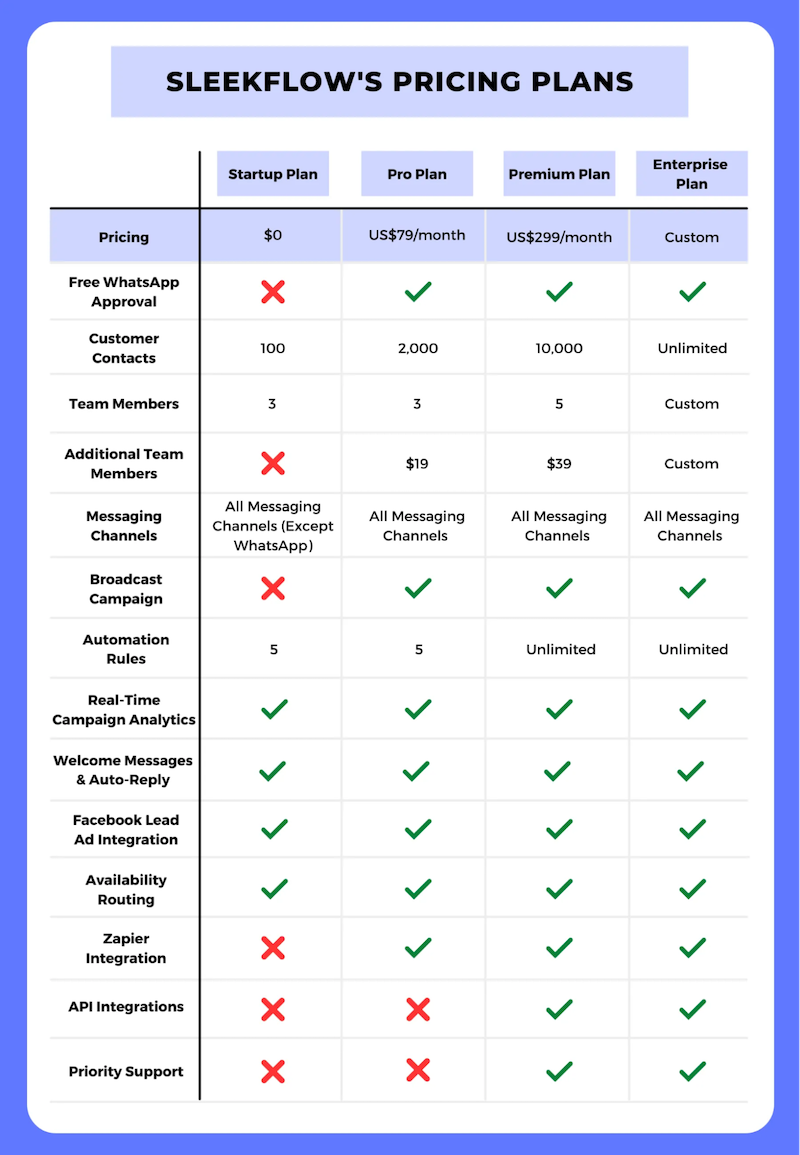
SleekFlow typically employs a SaaS (Software as a Service) tiered pricing model. This structure is designed to cater to businesses at different stages of growth, allowing them to pay only for the features and capacity they currently need.
Overview of Pricing Tiers
General Purpose of Each Tier
-
Free Plan: This is the entry-level tier, designed primarily for evaluation and very low-volume usage. It serves as a "sandbox" for businesses to test the interface and ensure the platform connects correctly with their social channels.
-
Startup/Basic: This tier introduces the core functionality required for a small team to operate effectively. It moves beyond simple testing into actual daily usage, unlocking essential features for organization and basic collaboration.
-
Pro / Growth: This is the "workhorse" tier for scaling companies. It introduces powerful automation and integrations, transforming the platform from a simple inbox into a sales engine.
-
Enterprise: This tier provides a bespoke experience. It unlocks the full potential of the platform with custom limits, security compliance, and dedicated support, ensuring the software fits into complex corporate ecosystems.
Typical Target Audience
-
Free: Solopreneurs, freelancers, and micro-businesses with very few daily inquiries.
-
Startup: Small local businesses, boutique agencies, or teams of 2-3 support agents.
-
Pro: Growing e-commerce brands, mid-sized sales teams, and businesses that rely on CRM data to drive marketing.
-
Enterprise: Large retail chains, banks, insurance firms, and organizations with strict data governance requirements.
Key Factors Influencing Price
Number of Users/Seats
One of the biggest drivers of cost is the size of your team. Most plans come with a set number of "seats" (logins). If you have a customer support team of 10 people, you will likely need a higher tier or pay for "add-on" seats. Managing user roles and permissions also becomes a paid feature in higher tiers.
Volume of Conversations/Messages
SleekFlow, like many competitors, often caps the number of "Active Contacts" or conversations you can manage per month. An "Active Contact" is typically defined as a unique person you have messaged within a billing cycle. As your marketing becomes successful and you reach more people, your pricing tier will inevitably rise to accommodate this volume.
Access to Advanced Features
The real differentiator between paying $50 and $500 a month is often feature access. Critical capabilities like connecting to Salesforce or HubSpot, running automated "drip" marketing campaigns, or using advanced broadcasting tools are usually gated behind the more expensive Pro and Enterprise plans.
How to Find Up-to-Date Pricing Information
SaaS pricing changes often, so the most reliable way to get current rates is to check SleekFlow’s official pricing page. For higher-tier or enterprise plans, pricing is usually not listed publicly and requires contacting the sales team. This allows them to provide a custom quote based on usage, integrations, and contract terms.
Understanding Potential Additional Costs
The base monthly fee is rarely the final number on your invoice. You must budget for these "hidden" or variable costs.
Overage Charges for Messages
On some plans, you might have a limit on how many "active contacts" you can have or how many broadcast messages you can send. If you go over this limit, you might have to pay extra fees. Also, remember that using the WhatsApp Business API itself has costs paid directly to Meta for conversations, which are separate from SleekFlow's fee.
Premium Add-ons and Integrations
Some special features are not included in the main plans. You might have to pay extra for:
-
Connecting to a specific e-commerce platform like Shopify.
-
Using advanced "Flow Builder" tools.
-
Adding extra users beyond the plan's limit.
API Usage Fees
If you are a developer and want to build your own custom app using SleekFlow's API, there might be extra costs if you make a lot of "calls" (requests) to their system.
Tips for Choosing the Right SleekFlow Plan
How do you pick the best one?
Assess Your Current and Future Needs
Look at your team. Do you have 3 people or 30? Look at your customers. Do you talk to 100 people a month or 10,000? Pick a plan that fits you now but has room to grow.
Prioritize Essential Features
Make a list of "must-haves." Do you absolutely need to connect to Salesforce? Do you need to send broadcasts? Do not pay for a big plan if you only need the simple features.
Compare Value vs. Price
Do not just look at the price tag. Think about what you get. If a plan costs $100 a month but saves your team 10 hours of work, it is worth it. That is a good ROI.
Don't Hesitate to Contact Sales
If you are not sure, talk to their sales team. They can explain the hidden details and sometimes even give you a discount if you pay for a whole year at once.
Alternatives to SleekFlow
SleekFlow is not the only choice. There are other comprehensive solutions worth considering that offer powerful features and competitive pricing.
Pancake: Unified Conversation Management
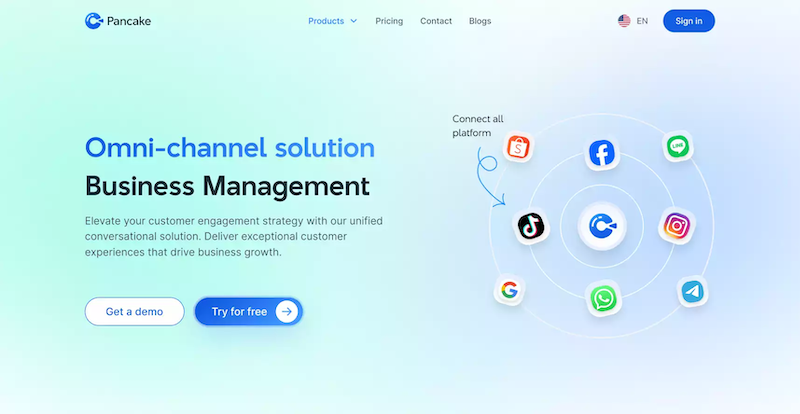
Pancake is a robust platform designed to manage all your customer conversations in one unified interface.
-
Key Features: It excels at organizing chats with conversation tagging and automatically assigning conversations to specific staff members to ensure efficient workflow.
-
AI Assistant: Pancake leverages advanced AI with features like Automatic Reply Suggestions and Emotion Detection, helping your agents respond more quickly and empathetically.
-
Pricing: You can start with a 14-day free trial that includes full access to all features. After the trial period, you can choose from flexible packages, Small, Standard, or Business, or opt for a custom plan tailored to your specific enterprise needs.
Botcake AI Integration
For advanced automation, Pancake integrates seamlessly with Botcake AI, a powerful tool for automating customer interactions.
-
Automation & AI: It helps automate responses and nurture customer relationships through intelligent message flows.
-
Unbeatable Value: A major highlight is that Botcake can be used completely free of charge, offering up to 500,000 free automated messages per month. This makes it an exceptionally cost-effective choice for small businesses or those just starting out.
Comprehensive Ecosystem (CRM & POS)
Both Pancake and Botcake integrate deeply with CRM and POS systems. This capability ensures that all your customer data, orders, and interaction history are perfectly synchronized across your business operations, providing a single source of truth.
This powerful, integrated ecosystem presents a highly compelling alternative to SleekFlow, one that is definitely worth considering.
Conclusion
Understanding SleekFlow pricing is the first step to building a better communication strategy. You need to look beyond the monthly fee and understand the limits, the extra costs, and the value of the features. Whether you choose a basic plan to start or a large enterprise plan to scale, the right tool, such as Botcake, a powerful and cost-effective solution to automate your chat marketing and sales on platforms like Messenger and WhatsApp.
Related blogs

Chatbot AI Messenger: Cách hoạt động, ứng dụng và triển khai
How to Set Up Meta Business AI on Messenger

Top E-commerce Use Cases of Meta Business AI

Discover how your business can connect with customers 24/7 with Botcake
- Automate your customer messaging flow
- React thousands with bulk marketing message campaigns
- Blend AI power seamlessly with your customer service