

Broadcast Messenger: A Guide to Reaching Your Audience 2026
 Madeline Talavera
See how a broadcast messenger sends one message to many people at once. This guide shows you how to use chat tools to segment your audience, personalize messages, and grow your business.
Introduction
In a world full of noisy ads and overflowing email inboxes, it's challenging for businesses to stand out, as customers often ignore traditional marketing methods. This is where the power of a broadcast messenger, a "one-to-many" tool, comes into play, allowing a business to send a single message to a large list of customers simultaneously in their preferred chat app.
Businesses use it because it's highly efficient, feels more personal, and yields incredible results, with messages achieving a 98% open rate, four times higher than email. This guide will show you how to use a broadcast messenger strategy to run personalized campaigns that convert, helping you turn every message into a new opportunity.
Understanding Broadcast Messenger Platforms
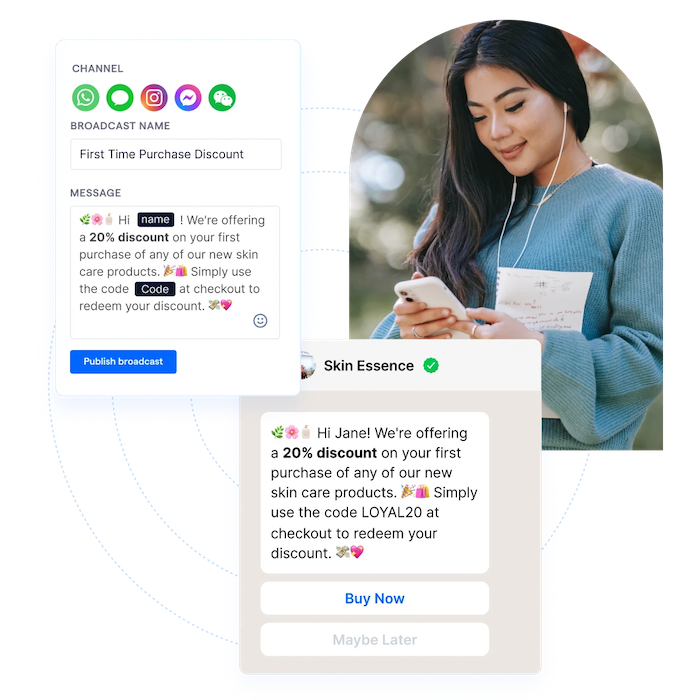
Before sending your first message, it is essential to know the tools available to you. A broadcast messenger is a feature found inside many popular chat apps. Each app has its own rules and strengths.
Key Features to Look For
When you are picking a platform to manage your broadcasts, you should look for four key features:
-
Audience Sorting: The tool should let you sort your customer list into small groups (like "VIPs," "new customers," or "people who live in Hanoi"). This is also called "segmentation."
-
Scheduling: You should be able to write your messages now and "schedule" them to send out later, at the perfect time (like on a holiday or in the evening).
-
Reports: The tool must show you how well your messages are doing. You need to see how many people opened your message and how many people clicked your link.
-
Connections: The platform should connect to your other business tools, like your customer database program (also called a CRM).
Popular Broadcast Messenger Platforms
Here are the most common platforms that businesses use for broadcasting:
-
WhatsApp Business: This is the most popular chat app in the world. The free app features a limited broadcast list. You can only send to 256 people, and they must have your number saved in their phone. The real power comes from the WhatsApp Business API. The API lets you send approved "template messages" to thousands of customers who have said "yes" to your messages.
-
Facebook Messenger: Messenger is another huge platform. Its broadcast rules are very strict to stop spam. You can usually only send a promotion to people who have chatted with your page in the last 24 hours. To send messages to people after that, you often have to pay for a "Sponsored Message" ad.
-
Telegram Channels: Telegram is renowned for its powerful broadcast tool, known as "Channels." A channel lets you send messages to an unlimited number of subscribers. It is a one-way broadcast, so people cannot reply in the channel. This makes it great for news, big updates, and announcements.
Compliance and Best Practices
This is the most important rule of using a broadcast messenger: DO NOT SPAM. Every app will ban you if you send messages to people who do not want them.
You must obtain clear permission from a customer before sending them a marketing message. This is referred to as an "opt-in." They must agree to get messages from you. You must also comply with privacy laws, such as GDPR. Always protect your customers' information and make it very easy for them to "unsubscribe" or stop your messages at any time.
Crafting Effective Broadcast Messages
A great broadcast is not just about sending a message. It is about making a message that people want to read and click on.
Content Strategies for Engagement
-
Make it Personal: Do not just say, "Hi." Use the person's name. A message that says, "Hi Sarah, here is a special offer just for you!" feels much more personal and special.
-
Give Real Value: Do not just ask people to buy things all the time. Send them helpful tips, exclusive discounts, or early access to a new product. Make them feel happy to be on your list.
-
Keep it Short and Clear: People read chat messages very quickly. Get to the point fast. Use simple words and fun emojis to make your message friendly.
Message Formats and Media
This is why chat apps are so much better than old SMS text messages. You are not stuck with plain, boring text.
-
Use Rich Media: Always use a high-quality image, a short video, or a fun GIF to capture people's attention. A picture of your new product is 1,000 times better than just words.
-
Use Call-to-Action Buttons: This is the best feature. Instead of a long, ugly website link, you can add a clean, tappable button. This button can display text such as "Shop Now," "Learn More," or "Book Your Spot." This makes it super easy for customers to do what you want them to do.
Segmentation and Targeting
This is the secret to great marketing. Do not send the same message to everyone. Utilize your customer database to categorize your audience into targeted groups. This is a key part of any effective marketing strategy, including segmentation.
-
For Retail & Fashion: Send limited-time offers in bulk or keep your audience updated with new collection drops.
-
For Food & Beverage: Promote new menu items or distribute vouchers automatically to increase bookings and order value.
-
For Education: Broadcast information about new webinars and course launches, or send automatic reminders for course start dates.
When you send messages that are helpful and relevant, people will be happy to get them. This is how you build a strong list and make more sales.
Implementing and Optimizing Your Broadcast Messenger Strategy
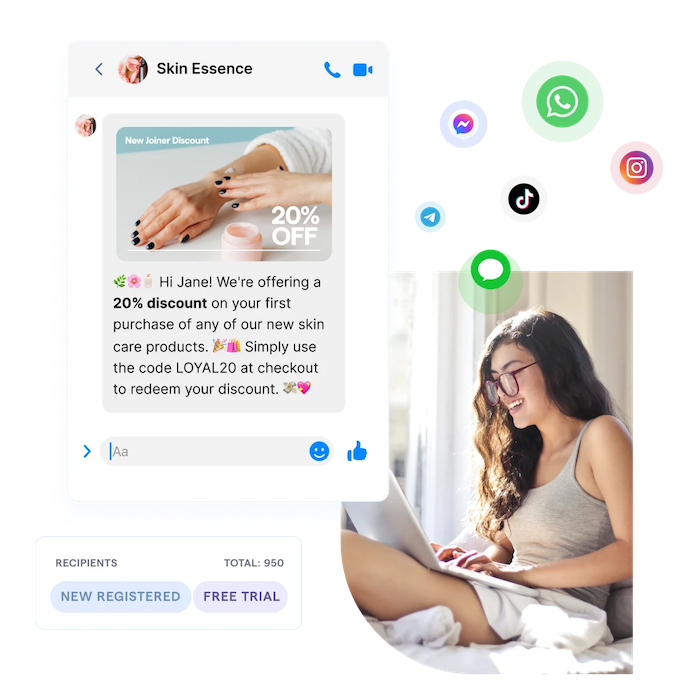
Getting started is easy if you follow a few simple steps.
Step-by-Step Setup
-
Set Up Your Channel: First, you need to set up your business account. This may involve setting up your Facebook Messenger, obtaining the WhatsApp Business API, or setting up a Telegram Channel.
-
Get Permission: You must build your broadcast list correctly. Add a checkbox on your website's checkout page that says, "Yes, send me updates on WhatsApp!" Alternatively, you can run an ad that asks people to sign up.
-
Create Your First Broadcast: Write your message. Add a great picture. Add a clear call-to-action button. Then, you can either send it right away or schedule it to send at a time when you know your customers are on their phones (like in the evening).
Measuring Success: Analytics and KPIs
You need to know if your messages are working. Look at the reports and track these important numbers:
-
Open Rate: How many people saw your message?
-
Click-Through Rate (CTR): How many people clicked your button or link? This is a very, very important number. With Botcake, you can achieve a CTR of up to 35% on WhatsApp campaigns.
-
Conversion Rate: How many people who clicked your button ended up buying something?
-
Unsubscribe Rate: How many people left your list? If this number is high, your messages may be perceived as boring, or you might be sending too many.
A/B Testing and Iteration
Never just guess what works best. You need to test it! A/B testing involves sending two different versions of your message to a small portion of your audience.
-
Version A: "Get 20% off today!"
-
Version B: "Our flash sale is here! 20% off"
You check which message gets more clicks. Then, you send the winning version to the rest of your big list. You should always be testing to improve your messages.
Integrating with Other Marketing Channels
A broadcast messenger does not replace your other marketing efforts, such as email or social media. It enables them to work more effectively together. You can use email for long newsletters. You can use social media to post fun updates and find new fans. Then, you can use your broadcast messenger for your most important, must-see news and sales.
Advanced Broadcast Messenger Tactics
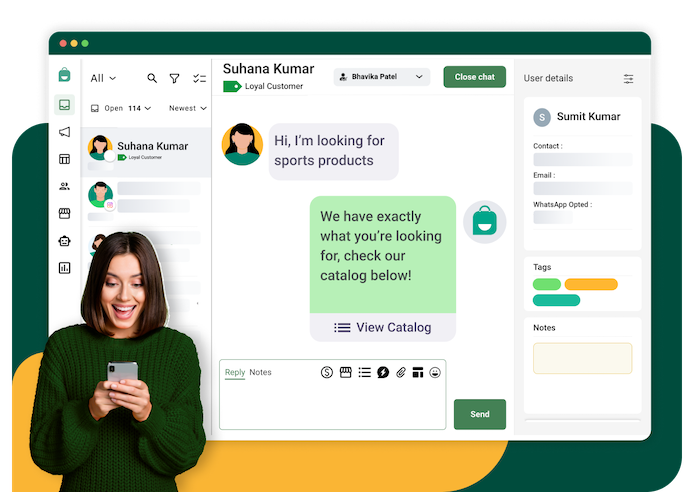
Once you have the basics, you can utilize broadcasts in even more intelligent ways.
Automating Workflows with Broadcasts
You can use a broadcast to start an automatic, hands-free conversation.
-
Welcome Sequence: When someone new joins your list, you can have a bot automatically send them a series of 3-4 "welcome" messages over a few days.
-
Abandoned Cart: If a customer leaves an item in their cart on your website, you can send them a reminder message on WhatsApp an hour later.
-
Event Reminders: If someone signs up for your online class, you can send them a reminder 24 hours before and another one 10 minutes before it starts.
Customer Support via Broadcast
You can use broadcasts to stop problems before they even start. If your website is going to be down for one hour to fix, send a broadcast to let all your customers know. This is much better than getting hundreds of angry support messages.
Leveraging Broadcasts for Sales
This is the most popular way to use broadcasts. They are ideal for generating a high volume of sales quickly.
-
Flash Sales: "Our 50% Off Flash Sale starts NOW. It only lasts for 2 hours. Go!" This creates excitement and prompts people to make a purchase quickly.
-
Product Launches: Give your loyal broadcast subscribers the exclusive opportunity to purchase your new product before anyone else.
Common Challenges and Solutions
Using a broadcast messenger is powerful, but you must be cautious to avoid common mistakes.
-
Problem: Annoying People by Sending Too Many Messages. If you message your list every day, people will get annoyed and will block you. Solution: Find the right balance. For most businesses, sending one to two marketing messages per week is the ideal amount. Always provide people with a clear and easy-to-use "unsubscribe" button in every message.
-
Problem: Messages Not Getting Delivered. If too many people block you, the platforms (like WhatsApp) will think you are a spammer. They might stop delivering your messages or even ban your account. Solution: Your reputation is everything. Only send good, helpful messages to people who permitted you to chat with them.
-
Problem: Getting Too Many Replies at Once. If you send a message to 20,000 people, you might get 1,000 replies at the same time! Your small team cannot answer all of those. Solution: You must have a plan. Use a platform that has a shared team inbox. Most importantly, use a smart conversational AI chatbot to automatically answer the most common replies (like "What is the price?" or "Is this still in stock?").
Conclusion
A broadcast messenger is one of the best tools a modern business can have. It lets you send your message right into your customers' pockets, and with a 98% open rate, almost all of them will see it. If you are ready to stop being ignored and want to start having real conversations that lead to more sales, it is time to explore a platform like Botcake to manage your business messaging.
Related blogs
Chatbot AI Messenger: Cách hoạt động, ứng dụng và triển khai
How to Set Up Meta Business AI on Messenger
Top E-commerce Use Cases of Meta Business AI

Discover how your business can connect with customers 24/7 with Botcake
- Automate your customer messaging flow
- React thousands with bulk marketing message campaigns
- Blend AI power seamlessly with your customer service